Can ChatGPT Make the Bulin 47 AI Video? What Works in 2026
If you searched this question, you probably want one simple result: a vertical clip where your face replaces the lead performer in the red-door freestyle. The honest answer is that a normal ChatGPT conversation can help you plan the clip, write a shot list, improve a prompt, check a photo and explain the trend. It does not, by itself, guarantee the fixed Bulin 47 reference, the correct motion transfer or a downloadable 9:16 MP4 from this exact scene.
That distinction saves time and credits. OpenAI’s official Sora page says the Sora product is no longer available as of 26 April 2026, while ChatGPT remains useful as a creative assistant. A dedicated fixed-reference workflow is built for the remaining job: take one permitted photo, map it onto the known movement, render the clip and show the cost before payment. This page explains where ChatGPT fits, where it stops, and what to do next.

Quick answer: can ChatGPT make the Bulin 47 AI video?
ChatGPT can explain the Bulin 47 trend, write a prompt or shot list, and help you choose a stronger source photo. A normal chat does not create this site’s fixed-reference face-swap MP4. To put an authorised face into the recognisable red-door choreography, use a purpose-built Bulin 47 workflow, then use ChatGPT for planning, captions and quality checks.
Can ChatGPT Make the Bulin 47 AI Video? The Direct Answer
The search phrase hides two different jobs. The first job is language: understand the reference, describe the red-lit doorway, write a caption, draft a short storyboard or turn your idea into instructions. ChatGPT is good at that. The second job is production: preserve a particular camera path and shoulder movement while replacing one person with a face from an uploaded photo. That requires a video-generation or video-replacement system with the reference already configured.
ChatGPT may be connected to tools in some accounts and regions, so the button you see can change over time. Check the actual output rather than trusting a promise in a chat: if you do not receive a playable video file, the request has not been rendered. This page describes the public workflow on 14 October 2026 and labels claims that depend on the current product configuration.
What ChatGPT can prepare
A concise visual brief, a shot-by-shot plan, a safe caption, translations, a posting checklist and feedback on whether your photo is front-facing, bright and unobstructed.
What a chat cannot promise
The original Bulin 47 footage, Kevin Wai’s presence, a specific actor’s likeness, a matching dance performance or a finished MP4 unless a real video tool completes the render and gives you the file.
What the fixed-reference workflow adds
The doorway, timing, camera movement and source sequence are already defined. Your permitted photo supplies the new lead subject, so you are not asking a text model to invent the entire scene from scratch.
How to Use ChatGPT Before You Make a Bulin 47 AI Video
The best workflow treats ChatGPT as a planning and review layer, not as evidence that a video has already been generated.
Start by asking ChatGPT to turn your idea into a small production brief. Tell it who is allowed to appear, where the clip will be posted and what must stay recognisable: vertical 9:16 framing, the shoulder cue, the red-lit doorway, a short runtime and a clear AI disclosure. Ask for three caption options that do not imply Bulin 47 or Kevin Wai endorsed your remix.
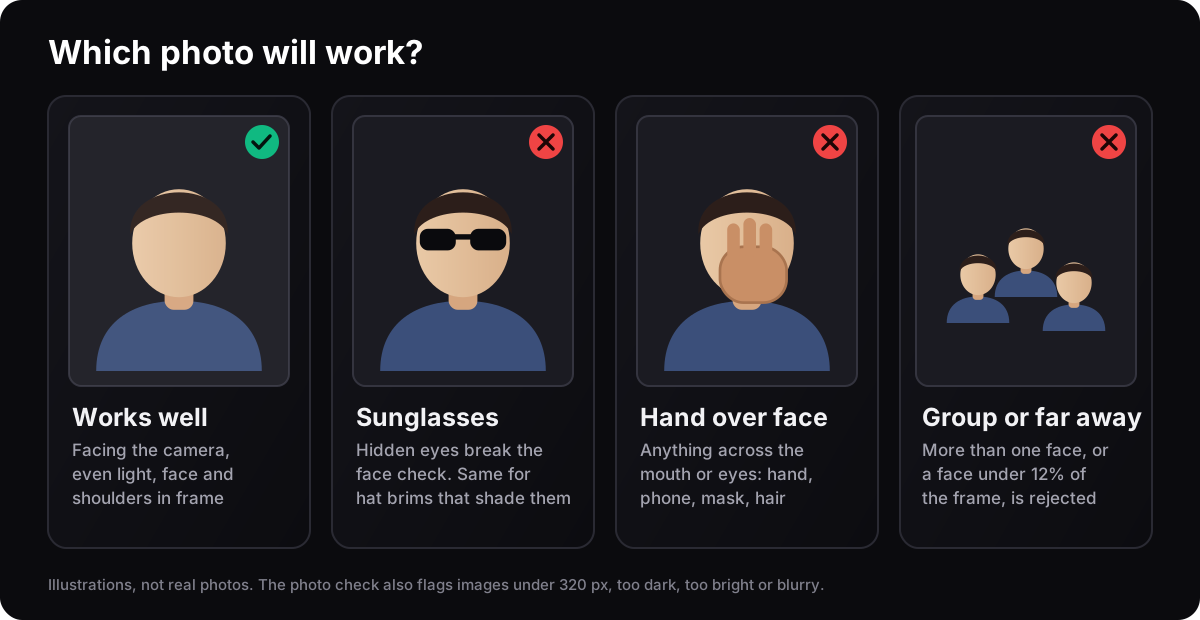
Next, ask for a source-photo checklist. A useful answer should remind you to use one adult who agreed, face the camera, show the eyes and shoulders, avoid sunglasses and keep the image sharp. It should also tell you what it cannot know from text alone: whether the live generator will accept the file, whether the result will preserve your identity during a fast turn or whether a platform will mute the music.
After rendering, ChatGPT can help you inspect the result if you upload a permitted frame or describe the failure. Ask it to look for identity drift, melted hands, a face that disappears during the head turn, a doorway that changes into a generic set, or a caption that accidentally calls the AI remix the original. Those checks are more useful than asking for another confident prediction.
Prompt you can copy into ChatGPT
“I want a clearly labelled fan remix of the Bulin 47 red-door freestyle using my own adult photo. Give me a 6-line visual brief, a consent reminder, three honest captions and a checklist for face, hands, lighting, camera path and AI disclosure. Do not claim an official connection.”
A question that exposes overpromising
Ask: “What part of your answer is a plan, and what part is a file you actually generated?” A plan is useful; it is not a render receipt, a source credit or proof that a person appeared in the original clip.
Where ChatGPT saves time
It can rewrite one idea for TikTok, Reels and Shorts, translate it into Spanish, shorten a caption to fit a platform limit and turn a failed first attempt into one targeted photo or review change.
ChatGPT vs Other Ways to Make a Bulin 47 AI Video
The right option depends on whether you want advice, a new scene or this recognisable reference with your face in it.
Swipe the table to compare tools →
| Job to be done | ChatGPT chat | Generic text-to-video | Fixed Bulin 47 workflow |
|---|---|---|---|
| Explain the trend | ✅ Strong at summaries and questions | Possible, but not the main job | Explains the reference on the page |
| Write a prompt or caption | ✅ Best fit | Uses the prompt as input | No long prompt needed |
| Keep the same doorway and movement | Not guaranteed | Needs reference controls and retries | ✅ Fixed reference sequence |
| Use one permitted photo | Can review the photo | Varies by model and input support | ✅ One-photo face replacement |
| Get a vertical MP4 | Only if a connected video tool really renders | Usually yes, with model-specific limits | ✅ 9:16 MP4 in 720p or 1080p |
| Know the cost before rendering | Depends on the connected product | Depends on the provider | ✅ Credits and price shown before payment |
| Best for a new world or story | ✅ Planning and story development | ✅ Flexible scene creation | Less suitable: the scene is intentionally fixed |
Turn a ChatGPT Brief into a Verifiable Video Handoff
Keep planning, generation and review distinct. A written description, an image and a playable video are different deliverables.

Name the deliverable
Ask for a planning brief or an actual downloadable video, and check which tools are available in that conversation. Text describing a video is not a generated MP4.
Supply the constraints
State that you have one permitted adult photo, want the fixed freestyle or a new scene, and need a particular duration and aspect ratio.

Ask for unknowns explicitly
Have the assistant separate what it can inspect from what needs a live generator check. It should not promise a face will stay stable based only on your description.

Choose the generation route
A fixed-reference tool needs the photo; a prompt-led tool may need the brief and extra references. Check the receiving tool’s controls instead of pasting a prompt where none is accepted.

Create the file in the chosen tool
Use the complete generation tutorial for this site’s upload, account and payment steps. Keep the job status and final download separate from the chat’s plan.

Review the complete motion
Watch the file yourself. A screenshot can help discuss a visible artifact, but cannot prove continuity across turns or verify the audio throughout the video.

Use ChatGPT for a targeted revision
Describe the specific problem and ask for one change: a clearer source, shorter caption or different edit. A proposed fix is a hypothesis to test, not proof that the next paid attempt will succeed.
The page describes the current published workflow; render time, available options and price can change when the production configuration changes.
What the Bulin 47 AI Video Looks Like
The sample is an AI fan remix, not the original street footage. Compare the source photo, reference frame and finished motion before you judge the result.

User Portrait

Reference frame
The clips on this page are presented as examples. The original performance, music and likeness rights belong to their respective owners.
How to Tell Whether Your Bulin 47 AI Video Is Ready
A successful render is not automatically a good post. Pause on the opening frame: does the person look like the authorised subject, or does the identity already drift? Scrub through the fastest turn and the shoulder movement. Look at fingers, teeth, glasses, hair edges and the boundary between face and neck. AI errors hide when a clip plays quickly and become obvious when someone pauses it.
Then compare the scene, not just the face. The red doorway, camera push, crowd direction and light should remain coherent with the reference. If the background changes into a new location, that may be a creative result, but it is not a faithful Bulin 47 template remix. Use an honest caption such as “AI fan remix inspired by the Bulin 47 freestyle” instead of calling it the original video or an official collaboration.
Finally, check the file on the platform where you will post it. A download can look clean in a local player and be cropped, muted or labelled differently after upload. Keep a copy of the MP4, add the platform’s AI disclosure and use the official sound picker where available. ChatGPT can help write the checklist; your eyes and the platform preview still make the final call.
Identity
Face, hair, eyes and skin tone remain stable through the turn.
Motion
Shoulders, elbows and hands follow the reference without melting or freezing.
Scene
The doorway, crowd, camera direction and light do not suddenly become another shot.
Disclosure
The caption and platform label say AI fan remix and do not imply official involvement.
Consent, Privacy and Music for a Bulin 47 AI Video
01 · LikenessUse a face you are allowed to use
Use a face you are allowed to use
Upload yourself or an adult who gave permission. Do not use a celebrity, public figure, minor or stranger to make a deceptive post. A ChatGPT prompt cannot create consent after the file is uploaded.
- Own photo or adult permission
- No minors
- No impersonation
02 · PrivacyKnow what the upload is for
Know what the upload is for
The published workflow uses the image to make the requested render and states that uploaded media is deleted after 24 hours and is not sold or used to train AI models. Read the current privacy and terms pages before uploading anything sensitive.
- HTTPS upload
- 24-hour media retention
- Read Privacy
03 · MusicA video pack is not a music licence
A video pack is not a music licence
The original song and performance rights remain with their owners. If TikTok, Reels or Shorts mutes the file, add the official sound through the platform’s own licensed picker in your region. Do not present a purchased render as permission to redistribute the track.
- Platform sound picker
- Rights remain separate
- Label the remix
04 · AttributionKeep the original context visible
Keep the original context visible
Say that the result is an AI fan interpretation inspired by the Bulin 47 freestyle. Do not claim that Bulin 47, Kevin Wai or their labels made, approved or appeared in your new version.
- AI disclosure
- Credit the artists
- No official claim
ChatGPT and the Bulin 47 AI Video: FAQ
Got questions about video credits, payment safety, or export quality? Find direct answers below.
Can ChatGPT make the Bulin 47 AI video?
Can ChatGPT put my face into the Bulin 47 video?
Is Sora the same as ChatGPT for this question?
Can I use a ChatGPT prompt in any AI video generator?
Do I need a prompt to make a Bulin 47 AI video here?
Will my Bulin 47 AI video include the song?
How do I know whether a Bulin 47 video is original or AI?
Is bulin47.website an official Bulin 47 or Kevin Wai app?
What if ChatGPT says it made a video but gives me no file?
Ready to move from a ChatGPT plan to a real clip?
Use one permitted photo, run the free check, review the exact options and label the result as an AI fan remix.
Open the Bulin 47 generatorMore Bulin 47 AI Video Guides
- Prompts→
Bulin 47 AI Video Prompt Guide: Formulas & Presets
Copy-paste prompt formulas for Runway and Kling, negative prompts and camera parameters.
- Workflow→
How to Make a Bulin 47 AI Video: Step-by-Step
See the upload, photo-check, checkout and posting screens with screenshots.
- Source→
Bulin 47 Kevin Wai: Who Is Who in the Original Clip?
Separate the real street encounter, the song credit and later AI remixes.
- Compare→
Bulin 47 AI Video Alternatives
Choose between a fixed one-photo workflow, a generic video model and an editor.
- Make→
Bulin 47 Freestyle Generator
Start the live photo check when you are ready to render.
- Cost→
Bulin 47 AI Video Pricing
Check the current one-time packs and credit rates before payment.
- Context→
What Is the Bulin 47 Video?
Read the trend origin, original clip context and AI version boundaries.
How this ChatGPT and Bulin 47 answer was checked
We separated ChatGPT’s planning role from a real video render, checked the current OpenAI product statement and compared the published Bulin47 workflow with the output a searcher actually wants. Product settings, prices and third-party access can change, so the live generator and linked policy pages are the source of truth before payment.
Sources
What this page does not claim
It does not claim that ChatGPT, OpenAI, Sora, Bulin 47, Kevin Wai or a third-party model endorses this site. It does not promise that every uploaded photo will produce a perfect likeness, that a platform will keep the audio, or that a chat message is proof of a completed render.
Related pages
Last reviewed: 14 October 2026 · Written and maintained by Bulin47 Studio Editorial Desk.
Key factsChecked ChatGPT and Bulin 47: The Facts to Remember
ChatGPT is useful for planning, prompts, captions and review. A fixed-reference Bulin 47 render still needs a video workflow that accepts a permitted photo and returns a real MP4. Use the live generator and pricing page for the current production limits.
- ChatGPT’s best role
- Brief, prompt, caption, translation and quality checklist.
- Input for the fixed workflow
- One clear photo of an adult who consented.
- Output
- Vertical 9:16 MP4 in the currently offered 720p or 1080p options and 6, 12 or 23 second cuts.
- Cost model
- The photo check is free; paid renders use one-time credits and the exact price is shown before checkout.
- Privacy
- Read the current policy; the published workflow states media is deleted after 24 hours and is not used to train AI models.
- Disclosure
- Label the result as an AI fan remix and do not imply official involvement.
Written and maintained by the Bulin47 Studio editorial teamPublished Last updated