✦ AI pet remix
Ginger cat · Bulin 47TikTok · 9:16
Independent fan-made tool
Use the Bulin 47 Pet Video Generator to turn one dog or cat photo into a freestyle video. Your photo supplies the pet’s appearance; the fixed freestyle template supplies the movement. Expect a playful, upright dance: paws, body proportions and facial details can change during motion.
Bulin 47 · Pet edition
Same moves, same camera — your pet takes the lead
Your pet photo
Drop a pet photo or click to upload
JPG, PNG or WebP
One dog or cat, good light, eyes and muzzle visible. No toys or blankets covering face.
Quality
Length
The photo check is free and you see the exact price before you pay. Failed renders are refunded automatically.
By generating, you confirm this is your pet or you have the owner's permission to use the photo. Terms · Responsible use
Output
TikTok · 9:16
@midasvideo
TikTok · 9:16
@freddoapxj1
TikTok · 9:16
Clips shown with credit to their creators on TikTok.
Choose one pet with the eyes, muzzle, both ears and torso visible. Leave room around the body; avoid toys, hands or blankets covering the face or legs. Use a photo you own or have permission to process. The photo check is free; the generator shows the exact render price before you pay.
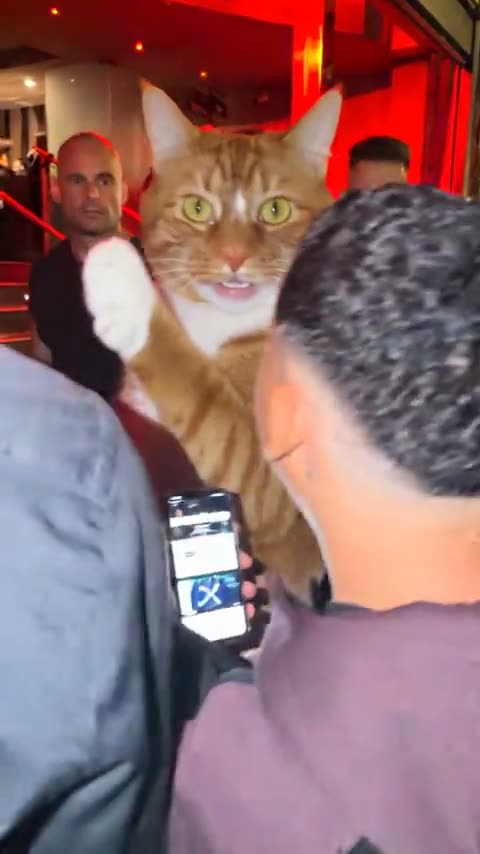
The Golden Retriever and ginger tabby examples were made with the Bulin 47 Pet Video Generator from the photos shown. Play each complete output to compare likeness, upright posture, paws and turns. The third, grey-cat clip is a separate reference sample.

Golden Retriever · actual input photo
The dog sample contains on-video text and a creator credit, with no audio track. The orange-cat sample has audio. These files show actual sample lengths and resolutions; choose current render settings in the generator above. Grey-cat reference credit: @freddoapxj1.
Choose a suitable pet photo, upload it to the generator at the top of this page, then select your render settings. No separate pet tool or prompt is needed.

Choose one standing or seated dog or cat, facing the camera or at a gentle angle. Keep the muzzle, both ears, chest and torso inside the frame; include the legs where possible. Upload it to the generator above. The browser check does not assess pet anatomy.

Pick 720p or 1080p and a 6, 12 or 23-second cut. The generator shows the exact credit cost before you pay, and your browser checks the photo’s size, sharpness and lighting for free. The video itself is not shown for free before you pay.

Start the paid render in the same generator, then download the finished MP4. Watch from beginning to end: check likeness, upright posture, paws and fast turns before sharing. A failed render returns credits automatically; a completed clip with visual distortions is a different case.
Before uploading, zoom in on the muzzle and ears, then zoom out to check the torso and legs. Use one sharp, evenly lit pet photo with a clear outline. You do not need to make your pet stand on two legs.
Check the muzzle, ear tips and chest before uploading your dog photo. This dog video was generated here from the photo shown.
Choose a front or gentle three-quarter view where the nose, mouth and both eyes are easy to distinguish. Keep ear tips inside the crop. A ball in the mouth, a hand under the chin or a deep side profile hides details needed to recognise your pet.

Check that your cat’s torso is visible and its paws are not hidden by objects. This cat video was generated here from the photo shown.
Use a standing or seated photo with the chest and torso visible, plus the legs where possible. A tight face crop leaves body proportions unseen. Beds, blankets, toys and another animal can hide the outline or make paws hard to separate.

Watch the whole sample to assess posture, paws and turns. Reference clip; not a verified result from this input.
The template uses a human performance, so your pet may stand on hind legs with front paws moving like arms. Limb length, paw shape and tail position may vary. During quick turns, the muzzle, ears or coat markings can also change between frames.
The browser check covers basic image quality; it does not validate a pet’s face, body or future motion. A clearer photo can reduce ambiguity, but it cannot guarantee a consistent result.
Pay once for credits that never expire. Pick your pack to turn your dog or cat into the viral red-door street dancer. Zero subscriptions.
Perfect for trying the viral trend once or testing your photo.
one standard video (720p · 23 s)100% Watermark-Free
$8.90 per finished video
Charged once · No auto-renew · Instant activation
Best for friends, family duets, and testing different outfits & expressions.
five standard videos100% Watermark-Free
Only $4.98 per video (vs $8.90 Starter · Save $19.60)
Save $19.60 vs single-video pricing
Built for TikTokers, meme pages, content agencies & high-frequency viral creators.
twenty standard videos100% Watermark-Free
Just $3.00 per video (Pack pricing · Save $118.10)
Lowest per-video cost · Save $118.10 total
SECURE PAYMENT METHODS
Bulin 47 AI Videos from $8.90 · No Subscription · Credits Never Expire · 100% Watermark-FreeFrom $8.90 · No Sub · Never Expire
A photo problem and a motion limitation need different responses. Change the input when details are hidden; expect some anatomy changes when a four-legged pet follows a human dance.
Swipe the table to compare tools →
| What You See (Symptom) | Likely Cause | What to Try Next | Credit & Retry Rule |
|---|---|---|---|
| The pet no longer looks recognisable | Face too small, side-on, blurred or in shadow | Use even light and a sharper front or gentle three-quarter view; retain the ears and torso | A new completed render uses credits |
| Fur colour changes | Coloured lighting, filter or low resolution | Use daylight or even indoor light and remove the filter | Quality retry (uses pack credit) |
| Ears or muzzle wobble | Toy or crop hides the outline; a fast turn can also change it | Try a photo with the whole muzzle and both ears visible. Turn-related changes may remain. | A new completed render uses credits |
| The pet stands upright or its paws change shape | Human choreography changes the pose; hidden legs add uncertainty | Show the torso and legs. Upright poses and limb changes can still occur with a clear photo. | A new completed render uses credits |
| A second animal appears | Group photo or crossed silhouettes | Upload one pet only and leave space around the outline | Quality retry (uses pack credit) |
| The video is silent | The file may have no audio track; the dog sample here is silent | Check player volume and the downloaded file before deciding whether to add sound in your editor | Check audio before making another paid render |
Choose a photo, understand the motion limits, and decide what to do if the result needs another try.
Ready to use the Bulin 47 Pet Video Generator? Open the homepage generator when you are ready, then choose a photo with the muzzle, both ears and torso visible, select your settings, and check the price before rendering.
Upload my pet’s photo →Make the human version, compare tools, or check pricing and privacy.
For a dog or cat video, start with photo suitability and review the complete motion. The same generator above handles upload and rendering; the guides below cover the general workflow and original video context.
The human dance can turn a four-legged pet upright. Paws, legs, tail, muzzle, ears and fur markings may change, especially during fast turns. A passed photo check does not predict anatomy or likeness in the finished video.
Last reviewed: 15 October 2026 · Written and maintained by Bulin47 Studio Editorial Desk.
The Bulin 47 Pet Video Generator uses one dog or cat photo with the fixed red-door freestyle template. Choose 720p / 1080p and 6 / 12 / 23 seconds, with packs from $8.90. Show the muzzle, both ears and torso; expect an upright dance in which paws, legs, tail and markings may change.
Written and maintained by the Bulin47 Studio editorial teamPublished Last updated