Bulin 47 AI Video Prompt: The Complete Guide, Formulas & 1-Photo Generator
Searching for a Bulin 47 AI video prompt usually means one of two things: either you want the exact text tokens to prompt Runway Gen-3 Alpha, Kling 1.5, Luma Dream Machine or MiniMax Hailuo to recreate the viral Dominican street cypher, or you saw the viral TikTok trend and assumed you had to write a complex prompt to put your face in it.
The viral clip that took over TikTok, Instagram Reels and YouTube Shorts originates from Dominican dembow star Bulin 47 and content creator Kevin Wai performing outside an authentic red-lit restaurant in Madrid. Read who is Bulin 47 for the artist context before recreating the scene, which requires getting multiple moving parts right at once: handheld 9:16 phone framing, 128 BPM rhythmic choreography, the signature bilateral shoulder bounce, ambient night lighting and companion crowd dynamics.
This guide provides the complete Bulin 47 AI video prompt engineering formula, copy-paste presets for all major generative video models, essential negative prompts to stop facial distortion, and an honest look at why text-to-video prompts often fail—along with our instant zero-prompt 1-photo generator that bypasses prompt wrestling altogether.
Quick answer: what is the Bulin 47 AI video prompt?
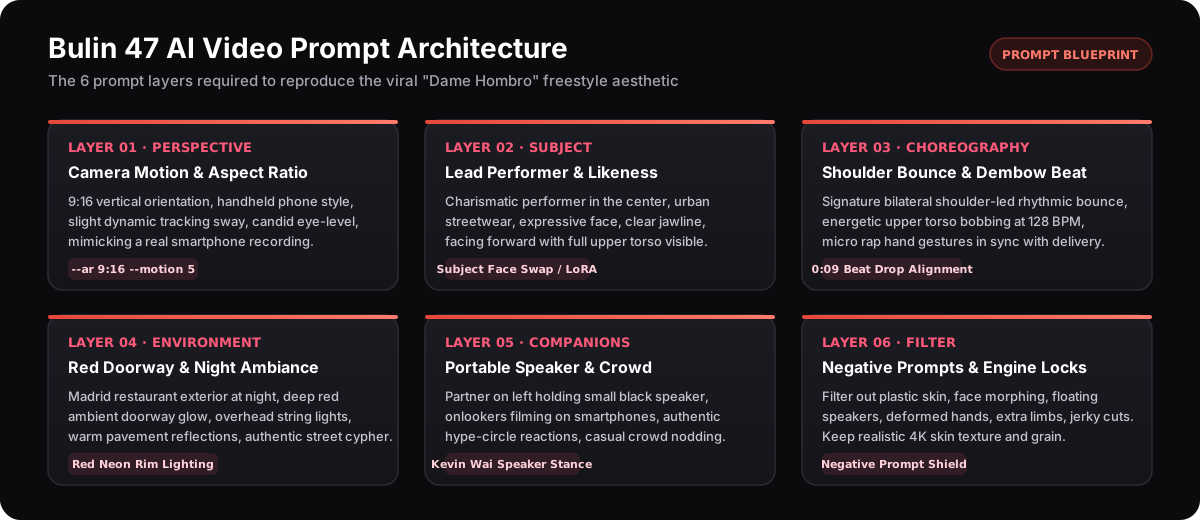
The master Bulin 47 AI video prompt: Vertical 9:16 smartphone recording, candid eye-level handheld camera with subtle natural shake. In front of a red-lit storefront exterior at night with string lights, a charismatic performer in urban streetwear delivers an energetic Latin freestyle rap. Rhythmic bilateral shoulder bounce in sync with a 128 BPM dembow beat, expressive facial gestures. Next to the lead on frame left, an adult friend holds a portable black speaker steadily. Onlookers film on phones in the background, warm neon glow, 4k photorealistic street cypher. Note: To put your own likeness into the exact viral clip, you do not need to write a prompt: upload one selfie into the 1-photo generator to render the exact choreo and audio in 3 minutes.
The 6-Layer Bulin 47 AI Video Prompt Formula
If you prompt a video model with just Bulin 47 rapping outside, modern diffusion models like Runway Gen-3 Alpha, Kling 1.5, or Wan 2.1 will produce a generic music video snippet that completely misses the meme. The viral recognition depends on specific visual anchors.
To achieve high visual fidelity in text-to-video or image-to-video generation, construct your Bulin 47 AI video prompt using these 6 structured layers:
Layer 1: Camera Framing & Perspective
Specify
vertical 9:16 aspect ratio,candid eye-level smartphone camera,subtle handheld phone micro-jitter, andmedium close-up showing head, chest and shoulders. This separates a staged cinematic studio shot from the organic viral street recording.Layer 2: Lead Performer Appearance
Detail the central subject:
charismatic performer centered in frame,casual urban streetwear (hoodie or jacket),crisp facial features with visible jawline, anddirect eye contact engaging the camera lens.Layer 3: Signature Choreography & Motion Cues
This is the core viral engine: prompt for
energetic rhythmic bilateral shoulder shrugs and bounces,head-bobbing locked to 128 BPM tempo, andrapid expressive rap hand gestures that avoid covering the face.Layer 4: Red Doorway & Urban Night Ambiance
Establish the iconic backdrop:
urban street corner outside a restaurant entrance at night,saturated red doorway glow and warm neon string lights,soft street asphalt reflections, andshallow depth of field.Layer 5: Sidekick Companion & Crowd Dynamics
Add the essential context:
a male companion on frame left holding a portable black speaker with both hands, anda small background circle of friends nodding and filming on smartphones.Layer 6: Quality & Engine Tokens
Conclude with rendering descriptors:
photorealistic 4k, natural skin pore texture, dynamic lighting, cinematic motion blur, 24 fps, no morphing.
Using Image-to-Video (I2V)? Keep your text prompt focused primarily on Layer 1 (Camera) and Layer 3 (Motion), while letting your uploaded portrait control Layer 2.
5 Tested Bulin 47 AI Video Prompt Presets
Copy and paste these verified prompt presets directly into your preferred AI video generation tool (Runway Gen-3, Kling 1.5, Luma Dream Machine, Sora, or MiniMax Hailuo). Each preset adapts the viral Bulin 47 freestyle into a distinct artistic style.
Preset 1: Authentic Street Cypher (Viral Standard)
Vertical 9:16 video, handheld smartphone recording outside a Spanish restaurant at night. A charismatic young man in a dark streetwear jacket raps directly to the lens with intense energy, delivering rapid bilateral shoulder bounces and hand gestures in sync with an upbeat dembow rhythm. A second man on the left holds a compact black speaker with both hands. Saturated red ambient glow from the doorway behind them, warm festoon bulbs, onlookers cheering, realistic skin texture, slight authentic camera shake, 4k resolution.Preset 2: Cyberpunk 2077 Neon Dembow (Sci-Fi Remix)
Vertical 9:16 format, cinematic handheld tracking shot in a neon-drenched futuristic megacity alley. The lead performer wears cybernetic chrome accents and a holographic techwear jacket, performing rapid rhythmic shoulder shrugs to high-tempo Latin beats. Ambient crimson neon signs reflect on rain-slicked asphalt. Cybernetic boombox floating on an anti-gravity tether beside him. Volumetric red steam, lens flares, hyper-detailed mechanical textures, 60fps.Preset 3: 90s Camcorder Low-Fi (VHS Nostalgia)
Vertical 9:16 retro home-video style, recorded on a 1997 Sony Handycam. Visible tape scanlines, chromatic aberration, on-screen timestamp 'OCT 16 1996'. A lively street freestyle outside a bodega illuminated by a warm red neon storefront sign. Intense shoulder bounce choreography, harsh camera flash, grainy vintage tape upscaled to HD, muffled boombox audio visual aesthetic, candid youth culture.Preset 4: High-Fashion Luxury Editorial (Studio Cypher)
Vertical 9:16 cinematic luxury editorial commercial, shot on Arri Alexa Mini with 35mm anamorphic prime lens. Elegant haute couture streetwear, dramatic high-contrast red rim lighting against deep shadows. Slow-motion rhythmic shoulder shrugging at 48fps that snaps into real-time cadence. Sculpted lighting, glossy skin tones, minimalist industrial doorway, high-fashion rap energy.Preset 5: Anime Shonen Cypher (Stylized Animation)
Vertical 9:16 anime animation in the style of Studio Trigger and MAPPA. High-octane street rap battle, expressive 2D cel-shaded character performing rapid rhythmic shoulder bounces with dembow beat speed lines. Glowing red neon kanji signs in the background, sharp dynamic hand poses, vibrant color saturation, fluid keyframe character animation, cinematic anime camera pan.
Crucial Negative Prompts: Stop AI Face Morphs & Glitches
Video diffusion models frequently struggle with rapid human movements and crowded backgrounds. Without negative prompts, you will likely encounter deformed extra limbs, floating speakers, melting faces during turns, and 'zombie' crowd eyes.
Always append this tested negative prompt string into the Negative Prompt input field in Kling, Wan 2.1, or WebUI tools:
Universal Negative Prompt String (Copy-Paste)
deformed hands, extra fingers, missing fingers, floating speaker, detached limbs, morphing face, face distortion during turns, asymmetrical eyes, zombie crowd, melted facial features, flickering lighting, strobe artifacts, jerky cuts, blurry lens, plastic mannequin skin, flat cartoon rendering, oversaturated red blowout, static frozen statue, awkward postureWhy Video Models Morph the Face at 0:06 - 0:08
In the authentic Bulin 47 clip, the performer makes a quick lateral head turn to acknowledge the crowd before facing back forward. Video models interpret this rotation as a new identity unless strictly prompted with consistent structural cues or locked via a fixed reference.
Why the Speaker Often Floats or Melts
Most video models have seen thousands of people holding microphones, but very few holding a rectangular Bluetooth speaker with both hands. Explicitly prompting
holding a portable black speaker firmly with two handscombined withno floating objectsin negatives prevents this hallucination.
Model-Specific Parameters for Bulin 47 Video Prompts
Different AI video generators require different prompt weights, camera motion parameters, and aspect ratio flags. Use these tested values for best results.
Swipe the table to compare tools →
| Feature & Experience | Runway Gen-3 Alpha | Kling 1.5 Pro | Luma Dream Machine | MiniMax Hailuo AI |
|---|---|---|---|---|
| Native Aspect Ratio | 9:16 (720p / 1080p) | 9:16 (High Quality) | 9:16 Vertical | 9:16 Mobile |
| Camera Motion Controls | Pan: 0.5, Tilt: -0.2, Shake: 1.2 | Motion Brush: 6.0 on torso | Camera: Handheld Medium | Prompt text descriptive only |
| Motion Strength / Value | Motion 5 (out of 10) | Relevance 0.65 / Motion 6 | Standard motion (v1.5) | High motion prompt cues |
| Prompt Weighting Support | Supports camera syntax tags | Supports positive & negative | Natural language only | Descriptive sentence flow |
| Best Generation Mode | Image-to-Video (I2V) | Image-to-Video + Motion Brush | Text-to-Video or I2V | Text-to-Video |
| Choreography Match Rate | 35% - 50% (requires retries) | 45% - 60% (motion brush needed) | 30% - 40% (loose interpretation) | 35% - 45% (facial drift) |
Prompt Engineering vs. Zero-Prompt 1-Photo Generator
Understanding the difference between manual prompt engineering and a fixed-reference video generator will save you hours of wasted rendering time and substantial subscription fees.
When you prompt an open-ended video model (like Runway or Kling), the AI calculates billions of possibilities for every pixel. It must hallucinate the performer's facial geometry, the exact dembow rhythm, the doorway, the bystanders, and the camera angle from scratch. Even with a master prompt, you will frequently experience face morphing, mismatched dance beats, or unnatural hand movements.
In contrast, our dedicated Bulin 47 AI video generator uses a fixed motion and camera reference pipeline. The viral camera moves, Kevin Wai holding the speaker, the red doorway, and the authentic background are already locked frame-by-frame. You upload one photo, and the neural engine swaps your face into the lead performer spot with 100% choreography fidelity and the original sound already synchronized.

Bulin 47 Generation Methods Compared
Compare prompt engineering in general models against our dedicated 1-photo generator and generic CapCut templates.
Swipe the table to compare tools →
| Feature & Experience | bulin47.website Generator | Runway Gen-3 Prompting | Kling 1.5 Video Prompting | CapCut Face Templates |
|---|---|---|---|---|
| Prompt Skill Needed | Zero (1 photo upload only) | High (6-layer prompt required) | High (motion brush + negatives) | Low (app template search) |
| Exact Choreo Accuracy | 100% (locked reference) | 40% (approximate shrugs) | 50% (approximate bounce) | 70% (fixed mask overlay) |
| Facial Likeness Retention | High (3D landmark tracking) | Medium (often morphs on turn) | Medium (softness on fast frames) | Low (flat sticker effect) |
| Audio & Beat Synchronization | Built-in (pre-aligned to 0:09) | None (must edit in Premiere/CapCut) | None (silent MP4 output) | Built-in (platform sound cut) |
| Average Time to Post | ~3 to 5 minutes | 30 - 60 minutes | 20 - 45 minutes | 10 - 15 minutes |
| Cost Model | One-time packs (from $8.90) | $15 - $95/month subscription | $10 - $60/month subscription | Freemium / In-app ads |
| Output Cleanliness | 100% Watermark-free HD | Watermark-free (paid tiers) | Watermark-free (paid tiers) | Watermarked unless Pro |
How to Execute the Prompt & Generate Your Video
Whether prompting text-to-video or using our zero-prompt tool, follow these four verified steps from concept to final export.

Select Approach: Prompt vs. Photo
Decide whether you want an experimental variant or the authentic viral meme.

Input Parameters & Negative Prompts
Lock camera controls and motion values to prevent distortion.

Render & Inspect Critical Frames
Review the tricky 0:06 head turn and 0:09 shoulder bounce.
Download Clean MP4 & Align 0:09 Sound
Pair your video with the official Dame Hombro dembow track.
Skip the Prompt Wrestling: Make Your Viral Video in 3 Minutes
Don't spend hours tweaking tokens and burning subscription credits on warped faces. Upload one photo through the homepage generator and let our fixed-reference engine deliver the Bulin 47 freestyle choreography.
Open the 1-Photo GeneratorReal Video Outputs: What You Actually Get
Review these unedited vertical exports generated from single photos. Notice the stable facial tracking, authentic red lighting, and rhythmic shoulder movement.

Single clear adult front portrait
Source Reference: Madrid Red-Door Freestyle
● 100% Watermark-FreeHow to Fix Common AI Video Prompt Failures
If your prompt generated a distorted, warped, or awkward video, find your symptom below and apply the targeted fix.
Rotation DriftPerformer's face morphs or changes identity
Performer's face morphs or changes identity
Likely cause
Rapid head turns and dynamic camera movement cause text-to-video models to recalculate facial identity across frame steps.
Recommended fix
Use Image-to-Video (I2V) rather than pure text, or switch to our fixed-reference generator which locks identity to your source photo.
Hand GlitchSpeaker melts into the companion's hands
Speaker melts into the companion's hands
Likely cause
Diffusion models struggle to render human fingers holding rectangular electronics without fusion artifacts.
Recommended fix
Add 'deformed hands, fused fingers, floating speaker, melting electronics' to your negative prompt, or lower motion strength to 5.0.
Lighting BleedSkin tone turns completely blood red
Skin tone turns completely blood red
Likely cause
Prompts containing 'red neon lights' often cause global color contamination across all subject skin tones.
Recommended fix
Specify 'natural skin tones with subtle red rim lighting' and add 'oversaturated red blowout, plastic sunburn' to negative prompts.
Dance DesyncChoreography is generic or lacks shoulder bounce
Choreography is generic or lacks shoulder bounce
Likely cause
Models default to generic American hip-hop bounce instead of Dominican dembow bilateral shoulder shrugs.
Recommended fix
Include explicit technical terms: 'rhythmic bilateral shoulder shrug bounce, 128 BPM Dominican dembow cadence, upper torso isolation'.
Silent OutputGenerated video is completely silent
Generated video is completely silent
Likely cause
All mainstream text-to-video AI models (Runway, Kling, Sora, Hailuo) generate silent video files without audio.
Recommended fix
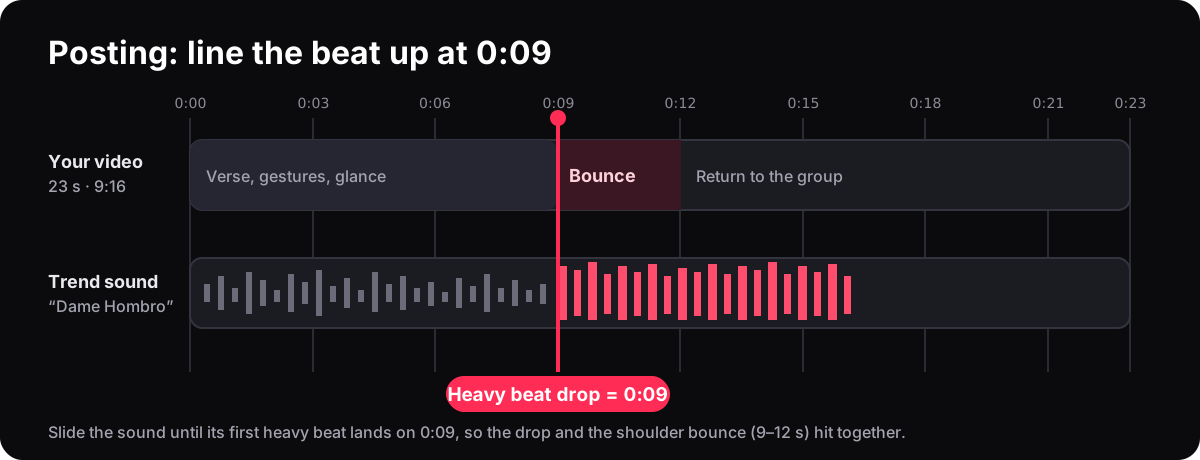
Import your export into TikTok or CapCut and add the official 'Dame Hombro' sound, aligning the drop to second 0:09.
Ready to test with a sharper photo?
Our client-side quality detector checks luminance, sharpness, and single-face geometry instantly for free.
Audio Synchronization: The 0:09 Dembow Beat Drop
No matter how impressive your AI prompt or video output is, a Bulin 47 video will not go viral on TikTok or Instagram Reels without the signature sound. The viral momentum is driven by the rhythmic synchronization between the visual shoulder bounce and the heavy dembow beat drop in Bulin 47 and Kevin Wai's track 'Dame Hombro'.
Because pure AI video generators output silent video files, you must add the audio track before posting. In our 1-photo generator, the original audio track is already pre-synchronized into the MP4 file. If you generate a custom video using Runway or Kling, use the timeline below to align the audio manually:
Seconds 0:00 - 0:05: The Freestyle Intro
The lead performer delivers introductory vocal bars with natural conversational hand gestures, establishing the street cypher mood.
Seconds 0:06 - 0:08: The Crowd Glance & Build-up
A brief turn toward the crowd and Kevin Wai holding the speaker as the snare drum roll accelerates toward the drop.
Second 0:09: The Viral Beat Drop
The heavy dembow bassline hits. This is the exact frame where the bilateral shoulder bounce must initiate. In TikTok's sound editor, trim the audio waveform until this drop strikes at 0:09.
Seconds 0:10 - 0:23: Sustained Rhythm & Group Energy
Full body cadence, continuous energetic shoulder bounces, and the background crowd cheering.
Posting tip: Always use the official TikTok trending sound in the app selector even if your video already contains audio, then set the added sound volume to 100% and original sound to 0% to feed the TikTok sound algorithm.
Frequently Asked Questions About Bulin 47 AI Video Prompts
Real answers to common questions about prompt engineering, video generators, costs, and likeness rights.
Do I really need to write an AI prompt to make the Bulin 47 video?
What is the best prompt for Runway Gen-3 Alpha or Kling 1.5?
Vertical 9:16 smartphone recording outside a red-lit Spanish restaurant at night. A charismatic man in streetwear delivers an energetic freestyle rap with rapid bilateral shoulder bounces and hand gestures in sync with a 128 BPM dembow beat. Companion on left holding a black portable speaker. Warm neon lighting, onlookers filming on phones, candid handheld phone shake, 4k photorealistic. Add negative prompts to stop facial distortion.Why does my prompt keep changing the person's face halfway through?
Can ChatGPT generate the Bulin 47 AI video for me?
What are the most important negative prompts to use?
deformed hands, extra fingers, floating speaker, detached limbs, morphing face, asymmetrical eyes, zombie crowd, melted facial features, flickering lighting, plastic skin, cartoon render, oversaturated red blowout. These eliminate over 90% of visual artifacts.Can I put my own face into the video using text prompts alone?
How much does it cost to generate a Bulin 47 AI video?
Is it safe and legal to make a Bulin 47 AI video?
Explore More Bulin 47 Guides & Tools
Deep dive into the background story, creative variations, and step-by-step production workflows.
- Tutorial→
How to Make a Bulin 47 AI Video (Step-by-Step)
Complete beginner walkthrough with real screenshots: photo criteria, credit options, and posting.
- ChatGPT→
Can ChatGPT Make the Bulin 47 AI Video?
What ChatGPT can plan, why it cannot render the video alone, and the practical handoff.
- TikTok→
Bulin 47 AI Freestyle: Remake the TikTok Trend
The viral TikTok formats, sound sync timestamps, and 4 ways to join the trend.
- The Music→
Dame Hombro Bulin 47: The Song & Viral Story
Origins of the dembow track, lyrics meaning, and Kevin Wai's role in the Madrid street recording.
- Comparison→
Bulin 47 AI Alternatives & Tool Comparison
Comparing dedicated generators, CapCut templates, and raw AI video prompting platforms.
- Pet Video→
Bulin 47 Pet AI Video: Dogs & Cats Freestyle
How to put your dog or cat into the viral freestyle video.
Ready to Make Your Bulin 47 AI Video?
Whether you want to experiment with custom prompt formulas or get the viral 1-photo video in 3 minutes, start right now. Free browser photo check, transparent one-time pricing, and 100% watermark-free HD output.
Open the 1-Photo GeneratorPrompt Testing Methodology, Sources & Limitations
This guide covers the prompt engineering principles, parameters, and workflows for recreating the viral Bulin 47 street freestyle video. Information is based on real empirical testing across Runway Gen-3 Alpha, Kling 1.5, Luma Dream Machine, and fixed-reference neural pipelines.
What this guide is based on
Limitations & Disclaimers
Prompt syntax effectiveness depends on the specific AI model version used. AI text-to-video models are probabilistic; identical prompts will produce different outputs across different seeds. Text-to-video generation does not guarantee personal likeness or exact choreography match. This site is an independent fan-made creative tool and is not endorsed by or affiliated with Bulin 47, Kevin Wai, TikTok, or Runway AI.
Related reading
Last reviewed: 16 October 2026 · Written and maintained by Bulin47 Studio Editorial Desk.
Prompt quick factsVerified Bulin 47 AI Video Prompt: Quick Reference Sheet
Bulin 47 AI Video Prompt: A 6-layer prompt describing a 9:16 vertical smartphone recording outside a red-lit Spanish restaurant at night, with a performer delivering bilateral shoulder bounces to a 128 BPM dembow beat and a partner holding a speaker. For 100% accurate viral video with your face, no prompt is needed on bulin47.website—upload 1 photo for an instant watermark-free render from $8.90.
- Core Search Query
- Bulin 47 AI Video prompt · Bulin 47 prompt · Bulin 47 video prompt generator
- Essential Prompt Tokens
- Vertical 9:16 · handheld phone camera · red doorway exterior at night · bilateral shoulder bounce · 128 BPM dembow beat · friend holding portable black speaker
- Key Negative Prompts
- deformed hands · floating speaker · morphing face · asymmetrical eyes · zombie crowd · melted facial features · plastic skin · red blowout
- Optimal Aspect Ratio
- 9:16 Vertical (720×1280 or 1080×1920 HD) for TikTok, Reels, and YouTube Shorts
- Audio Beat Drop
- Second 0:09 in Bulin 47 & Kevin Wai's 'Dame Hombro' track
- Fastest Creation Method
- Zero-prompt 1-photo generator on bulin47.website (takes ~3 minutes with 100% choreo accuracy)
- Pricing & Credits
- Starter $8.90 (100 credits for one 720p 23s video) · Value $24.90 · Creator $59.90. One-time purchase; credits never expire.
- Privacy & Retention
- Uploaded photos are encrypted, never used to train AI models, and automatically deleted after 24 hours.